How to Prevent "Hunt and Peck": 5 Drills to Teach Proper Finger Placement
You glance over at your child doing their homework and there it is - two index fingers jabbing at the keyboard like a chicken pecking at seeds. Every letter takes a visual scan of the entire keyboard, their eyes darting up and down between the screen and the keys. Sound familiar? You're watching the classic "hunt and peck" in action, and if left uncorrected, it becomes a deeply ingrained habit that's seriously hard to break later.
The good news? With the right drills and a bit of patience, you can help your child make the switch to proper finger placement - and once it clicks, they'll never go back. Here are five practical drills that actually work.
First, Why Does Finger Placement Matter So Much?
Before we jump into the drills, let's talk about why this matters. Hunt and peck typing has a hard ceiling. Kids who rely on it rarely get past 15-20 words per minute, and the constant eyes-on-keyboard approach means they can't focus on what they're typing - only on finding the right keys. That slows down everything from writing essays to chatting with friends.
Touch typing - where each finger is responsible for specific keys and your eyes stay on the screen - is what unlocks real speed and accuracy. And it all starts with the home row.
The Home Row: Your Child's Starting Position
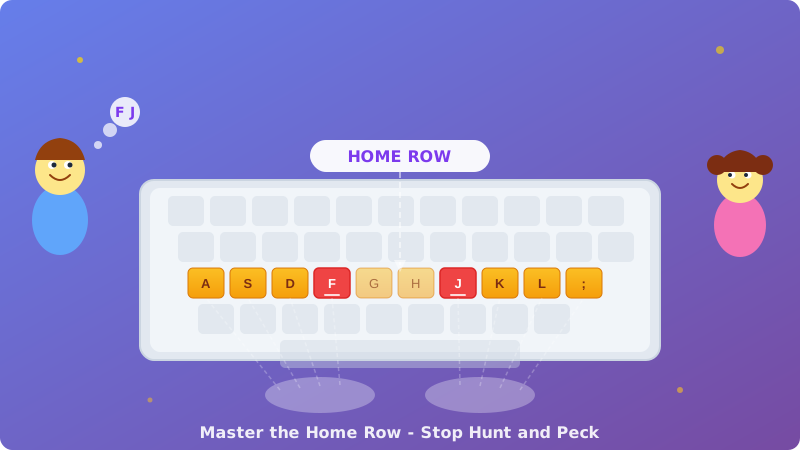
Every proper typing technique starts with the home row: the middle row of letter keys. The left hand rests on A, S, D, F and the right hand on J, K, L, and the semicolon key. The thumbs share the space bar.
Here's a quick trick that makes this easier for kids: those little raised bumps on the F and J keys? They're there for a reason. Teach your child to feel for those bumps without looking - that's their anchor point. If their index fingers are on F and J, the rest of the fingers naturally fall into place.
Drill 1: The "Bumpy Finger" Challenge
Start with the basics. Have your child close their eyes and place their hands on the keyboard. Their job is to find the F and J bumps using only touch. Once they've found them, they open their eyes to check. Make it a game - time them, or see how many times in a row they can land on the right keys with their eyes closed.
Why it works: This builds the tactile muscle memory that's the foundation of touch typing. If their fingers can find home without looking, they've already won half the battle.
Drill 2: The "Sticky Fingers" Home Row Drill
Place small, tactile stickers (a tiny dot of craft foam or a small adhesive gem works well) on the F and J keys as bonus landmarks. Then have your child type only home row letters - words like "flash," "salad," "lads," and "falls." The rule? Fingers must return to the home row after every single word.
Start with just two minutes at a time. The goal isn't speed - it's the habit of always returning to base. Once the return-to-home-row motion becomes automatic, everything else gets easier.
Drill 3: The "One Finger Spotlight"
This drill isolates individual fingers. Pick one finger - say, the left ring finger (responsible for W, S, and X). Have your child practise typing just those letters in short sequences: "sws," "sxs," "wxs." Then move on to the next finger.
Why it works: Hunt and peck happens because kids haven't trained each finger to "own" its keys. This drill gives every finger its own spotlight moment. It feels weird at first - the ring finger and pinky are notoriously lazy - but even a few minutes of isolated practice makes a real difference.
Drill 4: The "Blindfold Sentences"
Once your child is comfortable with the home row, it's time to level up. Cover their hands with a light cloth or a piece of cardboard (a cereal box cut to size works perfectly). Then dictate simple sentences for them to type. Start really simple: "dad has a salad" or "a lad falls fast."
They will make mistakes. That's fine - the point isn't perfect accuracy. The point is breaking the habit of looking at the keyboard. Even if their first few attempts are messy, their brain is learning to map finger movements to letters without visual confirmation. That's where real touch typing begins.
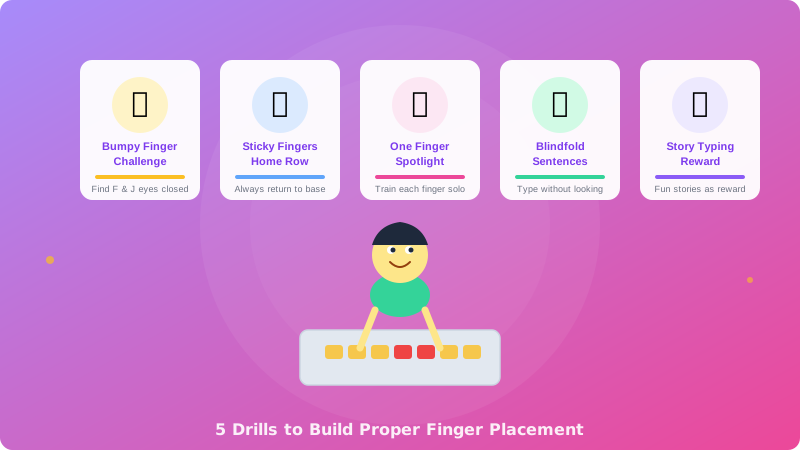
Drill 5: The "Story Typing" Reward
After the focused drills, reward your child with something more engaging - typing a story. This is where platforms like TypingTales come in perfectly. Instead of dry repetition, they get to type through an actual narrative, keeping their fingers on the home row while their brain is focused on what happens next in the story.
The trick is to do the technical drills first (even just 5 minutes), then move into story typing as the fun part. Over time, the proper finger placement transfers naturally into the story sessions because the muscle memory is already forming.
How Long Before You See Results?
Here's the honest truth: if your child has been hunt-and-pecking for a while, the first week of proper finger placement practice will feel slower. They might actually type more slowly than before, and that can be frustrating. Warn them about this in advance - it's completely normal.
Most kids start to feel comfortable with the home row within 2-3 weeks of regular short practice sessions (10-15 minutes a day). By week four, they'll typically match their old hunt-and-peck speed but with proper technique. And from there? The sky's the limit - proper finger placement is what takes kids from 20 WPM to 40, 60, and beyond.
The Bottom Line
Hunt and peck feels natural to kids because it's easy to start - just point and press. But it's a dead-end strategy. With these five drills, you can gently redirect your child toward proper finger placement that will serve them for the rest of their life. Keep sessions short, keep them positive, and let story-based typing be the reward that makes it all worthwhile.